A minimal email TUI where you read with Markdown and write in Neovim.
neomd.ssp.sh/docs
email
markdown
neovim
tui
1# neomd
2
3A minimal terminal email client for people who write in Markdown and live in Neovim.
4
5*Neomd is my way of implementing an email TUI based on my experience with Neomutt, focusing on [Neovim](https://www.ssp.sh/brain/neovim) (input) and reading/writing in [Markdown](https://www.ssp.sh/brain/markdown) and navigating with [Vim Motions](https://www.ssp.sh/brain/vim-language-and-motions) with the GTD workflow and [HEY-Screener](https://www.hey.com/features/the-screener/).*
6
7## The philosophy behind Neomd: What's unique?
8
9The key here is **speed** in which you can **navigate, read, and process** your email. Everything is just a shortcut away, and instantly (ms not seconds). It's similar to the foundations that Superhuman was built on: it runs on Gmail and makes it fast with vim commands.
10
11With the **HEY-Screener**, you get only emails in your inbox that you _screened in_, no spam or sales pitch before you added them. Or don't like them, just screen them out, and they get automatically moved to the "ScreenedOut" folder.
12
13With the [GTD approach](https://www.ssp.sh/brain/getting-things-done-gtd), using folders such as next (inbox), waiting, someday, scheduled, or archive, you can move them with one shortcut. This allows you quickly to move emails you need to wait for, or deal with later, in the right category. **Processing your email only once**.
14
15Also, we intentionally don't add more folders to the archive or file emails too, only archive (and work if you use business/personal - but that's not even needed). The goal is to let emails fade out, avoid the "busy work," and file them. We use search when we need it, or copy important information into Obsidian or our daily work. That's why we only have limited folders (and also why we currently can't add additional ones; see [FAQ](https://ssp-data.github.io/neomd/docs/faq/#is-it-possible-to-create-new-directoriestabs).
16
17But we have two additional **Feed** and **Papertrail**, two dedicated folders from HEY where you can read newsletters (just hit F) on them automatically in their separate tab, or move all your receipts into the Papertrail. Once you mark them as feed or papertrail, they will moved there automatically going forward. So you decide whether to read emails or news by jumping to different tabs.
18
19
20### Email Processing Workflow
21
22Here's how neomd combines HEY-Screener + GTD + Feed/Papertrail to process your email:
23
24```mermaid
25flowchart TD
26 Start([New Email Arrives]) --> AutoScreen{Auto-Screener<br/>Known Sender?}
27
28 AutoScreen -->|screened_in.txt| Inbox["📥 Inbox (Next)"]
29 AutoScreen -->|screened_out.txt| ScreenedOut[🚫 ScreenedOut]
30 AutoScreen -->|feed.txt| Feed[📰 Feed]
31 AutoScreen -->|papertrail.txt| PaperTrail[🧾 PaperTrail]
32 AutoScreen -->|Unknown| ToScreen[❓ ToScreen]
33
34 ToScreen -->|Press I| ClassifyIn[Add to screened_in.txt]
35 ToScreen -->|Press O| ClassifyOut[Add to screened_out.txt]
36 ToScreen -->|Press F| ClassifyFeed[Add to feed.txt]
37 ToScreen -->|Press P| ClassifyPaper[Add to papertrail.txt]
38
39 ClassifyIn --> Inbox
40 ClassifyOut --> ScreenedOut
41 ClassifyFeed --> Feed
42 ClassifyPaper --> PaperTrail
43
44 Inbox --> Process{Process Email<br/>GTD Decision}
45
46 Process -->|< 2 min?<br/>Do it now| Action[Reply/Handle<br/>Immediately]
47 Process -->|Waiting for others<br/>Press Mw| Waiting[⏳ Waiting]
48 Process -->|Not now, later<br/>Press Mm| Someday[📅 Someday]
49 Process -->|Time-specific<br/>Press Mc| Scheduled[🗓️ Scheduled]
50 Process -->|Delete<br/>Press x| Trash[🗑️ Trash]
51 Process -->|Reference only<br/>Press Mp or P| PaperTrail
52 Process -->|Newsletter<br/>Press F or Mf| Feed
53
54 Action --> Done{Done?}
55 Waiting --> Review[Review Later]
56 Someday --> Review
57 Scheduled --> Review
58 Feed --> ReadLater[Read in<br/>Feed Tab]
59 PaperTrail --> SearchLater[Search when<br/>needed]
60
61 Done -->|Yes| Archive[📦 Archive]
62 Done -->|Not actionable| Archive
63 Review --> Archive
64 ReadLater --> Archive
65
66 classDef folderStyle fill:#54546d,stroke:#7fb4ca,stroke-width:2px,color:#dcd7ba
67 class ToScreen,Inbox,ScreenedOut,Feed,PaperTrail,Archive,Waiting,Someday,Scheduled,Trash folderStyle
68```
69*all colored boxes represent neomd folders*
70
71**Key principles:**
72- **Screener first**: Unknown senders never clutter your Inbox, but get automatically wait in ToScreen for classification [more](https://ssp-data.github.io/neomd/docs/screener/)
73- **One-time decision**: Once you classify a sender (`I/O/F/P`), all future emails from them are automatically routed [more](https://ssp-data.github.io/neomd/docs/screener/#how-classification-works)
74- **GTD processing**: Emails in Inbox are processed once. Inbox acting as want/need to do *Next*, otherwise move to Waiting, Someday, or Scheduled
75- **Minimal filing**: Only Archive when done; no complex folder hierarchies. Use search to find old emails
76- **Separate contexts**: Feed for newsletters (read when you want), PaperTrail for receipts (search when needed)
77- See full features list below.
78
79
80## Screenshots
81
82### Overview: List-View
83
84Feed view with all Newsletters - also workflow with differnt tabs and unread counter only for certain tabs (not all):
85
86
87### Reading Panel
88
89Reading an email with Markdown 💙:
90
91
92
93### Sent emails
94This is the markdown sent:
95
96```markdown
97# [neomd: to: email@domain.com]
98# [neomd: subject: this is an email from neomd!]
99
100This email is from Neomd. Great I can add links such as [this](https://ssp.sh) with plain Markdown.
101
102E.g. **bold** or _italic_.
103
104## Does headers work too?
105
106this is a text before a h3.
107
108### H3 header
109
110how does that look in an email?
111Best regards
112```
113
114*Compose emails in your editor, read them rendered with [glamour](https://github.com/charmbracelet/glamour), and manage your inbox with a [HEY-style screener](https://www.hey.com/features/the-screener/) — all from the terminal.*
115
116
117Which looks like this:
118
119
120
121Or in Gmail:
122
123
124
125### Video
126
127 YouTube rundown of most features:
128 [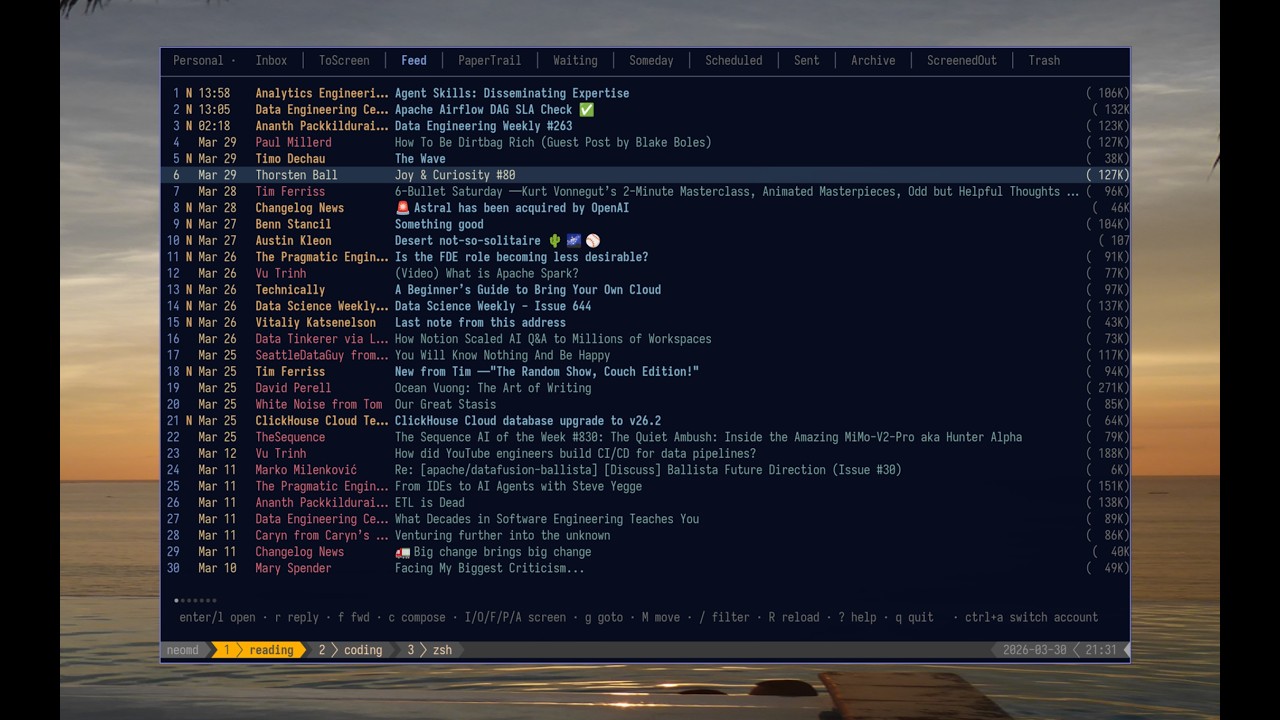](https://youtu.be/8aKkldYLWV8)
129*(shorter but limited showcase [part 1 video](https://youtu.be/lpmHqIrCC-w))*
130
131
132## Features
133
134- **Write in Markdown, send beautifully** — compose in `$EDITOR` (defaults to `nvim`), send as `multipart/alternative`: raw Markdown as plain text + goldmark-rendered HTML so recipients get clickable links, bold, headers, inline code, and code blocks [more](https://ssp-data.github.io/neomd/docs/sending/)
135- **Pre-send review** — after closing the editor, review To/Subject/body before sending; attach files, save to Drafts, or re-open the editor — no accidental sends [more](https://ssp-data.github.io/neomd/docs/sending/#pre-send-review)
136- **Attachments** — attach files from the pre-send screen via yazi (`a`); images appear inline in the email body, other files as attachments; also attach from within neovim via `<leader>a`; the reader lists all attachments (including inline images) and `1`–`9` downloads and opens them [more](https://ssp-data.github.io/neomd/docs/sending/#attachments)
137- **Link opener** — links in emails are numbered `[1]`-`[0]` in the reader header; press `space+digit` to open in `$BROWSER` [more](https://ssp-data.github.io/neomd/docs/reading/#links)
138- **CC, BCC, Reply-all** — optional Cc/Bcc fields (toggle with `ctrl+b`); `R` in the reader replies to sender + all CC recipients [more](https://ssp-data.github.io/neomd/docs/sending/#cc-bcc-reply-all-and-forward)
139- **Drafts** — `d` in pre-send saves to Drafts (IMAP APPEND); `E` in the reader re-opens a draft as an editable compose; compose sessions are auto-backed up to `~/.cache/neomd/drafts/` so you never lose an unsent email (`:recover` to reopen) [more](https://ssp-data.github.io/neomd/docs/sending/#drafts)
140- **HTML signatures** — configure separate text and HTML signatures; text signature appears in editor and plain text part, HTML signature in HTML part only; use `[html-signature]` placeholder to control inclusion per-email [more](https://ssp-data.github.io/neomd/docs/configuration/#html-signatures)
141- **Multiple From addresses** — define SMTP-only `[[senders]]` aliases (e.g. `s@ssp.sh` through an existing account); cycle with `ctrl+f` in compose and pre-send; sent copies always land in the Sent folder [more](https://ssp-data.github.io/neomd/docs/sending/#multiple-from-addresses)
142- **Undo** — `u` reverses the last move or delete (`x`, `A`, `M*`) using the UIDPLUS destination UID [more](https://ssp-data.github.io/neomd/docs/keybindings/#multi-select--undo)
143- **Search** — `/` filters loaded emails in-memory; `space /` or `:search` runs IMAP SEARCH across all folders (only fetching header capped at 100 per folder) with results in a temporary "Search" tab; supports `from:`, `subject:`, `to:` prefixes [more](https://ssp-data.github.io/neomd/docs/keybindings/#leader-key-mappings-space-prefix)
144- **Address autocomplete** — To/Cc/Bcc fields autocomplete from screener lists; navigate with `ctrl+n`/`ctrl+p`, accept with `tab`
145- **Everything view** — `ge` or `:everything` shows the 50 most recent emails across all folders; find emails that were screened out, moved to spam, or otherwise hard to locate [more](https://ssp-data.github.io/neomd/docs/keybindings/#folders)
146- **Threaded inbox** — related emails are grouped together in the inbox list with a vertical connector line (`│`/`╰`), Twitter-style; threads are detected via `In-Reply-To`/`Message-ID` headers with a subject+participant fallback; newest reply on top, root at bottom; `·` reply indicator shows which emails you've answered [more](https://ssp-data.github.io/neomd/docs/reading/#threaded-inbox)
147- **Conversation view** — `T` or `:thread` shows the full conversation across folders (Inbox, Sent, Archive, etc.) in a temporary tab with `[Folder]` prefix; see your replies alongside received emails [more](https://ssp-data.github.io/neomd/docs/reading/#conversation-view)
148- **Glamour reading** — incoming emails rendered as styled Markdown in the terminal [more](https://ssp-data.github.io/neomd/docs/reading/)
149- **HEY-style screener** — unknown senders land in `ToScreen`; press `I/O/F/P` to approve, block, mark as Feed, or mark as PaperTrail; reuses your existing `screened_in.txt` lists from neomutt; also acts as a **phishing defense** — impersonation emails from senders you've already approved land in ToScreen instead of Inbox, making them immediately suspicious [more](https://ssp-data.github.io/neomd/docs/screener/)
150- **Folder tabs** — Inbox, ToScreen, Feed, PaperTrail, Archive, Waiting, Someday, Scheduled, Sent, Trash, ScreenedOut [more](https://ssp-data.github.io/neomd/docs/keybindings/#folders)
151- **Emoji reactions** — press `ctrl+e` from inbox or reader to react with emoji (👍 ❤️ 😂 🎉 🙏 💯 👀 ✅); instant send with proper threading and quoted message history, no editor needed; reactions appear in conversation threads with neomd branding [more](https://ssp-data.github.io/neomd/docs/sending/#emoji-reactions)
152- **Spy pixel blocking** — tracking pixels from newsletter services (Mailchimp, SendGrid, HubSpot, etc.) are automatically detected, counted, and stripped; `°` indicator in the inbox and tracker domains in the reader header; browser view (`O`) blocks remote images via CSP — senders cannot tell if you read their email, similar to [HEY's spy pixel blocker](https://www.hey.com/features/spy-pixel-blocker/) [more](https://ssp-data.github.io/neomd/docs/reading/#spy-pixel-blocking)
153- **GitHub/Obsidian-style callouts in emails** — compose emails with callout syntax `> [!note]`, `> [!tip]`, `> [!warning]` for styled alert boxes in HTML emails; rendered with colored left borders, subtle backgrounds, and emoji icons [more](https://ssp-data.github.io/neomd/docs/sending/#callouts-admonition)
154- **Multi-select** — `m` marks emails, then batch-delete, move, or screen them all at once [more](https://ssp-data.github.io/neomd/docs/keybindings/#multi-select--undo)
155- **Auto-screen on load** — screener runs automatically every time the Inbox loads (startup, `R`); keeps your inbox clean without pressing `S` (configurable, on by default) [more](https://ssp-data.github.io/neomd/docs/screener/#auto-screen-and-background-sync)
156- **Background sync** — while neomd is open, inbox is fetched and screened every 5 minutes in the background; interval configurable, set to `0` to disable [more](https://ssp-data.github.io/neomd/docs/screener/#auto-screen-and-background-sync)
157- **Headless daemon mode** — run `neomd --headless` on a server to continuously screen emails in the background without the TUI; watches screener list files for changes via Syncthing; emails are auto-screened every `bg_sync_interval` minutes so mobile apps see correctly filtered IMAP folders; perfect for running on a NAS while using the TUI on laptop/Android [more](https://ssp-data.github.io/neomd/docs/configurations/headless/)
158- **Kanagawa theme** — colors from the [kanagawa.nvim](https://github.com/rebelot/kanagawa.nvim) palette
159- **IMAP + SMTP** — direct connection via RFC 6851 MOVE, no local sync daemon required and keeps it in sync if you use it on mobile or different device [more](https://ssp-data.github.io/neomd/docs/configuration/)
160- **Listmonk newsletter integration** — compose an email to a virtual address (e.g. `listmonk@ssp.sh`) and neomd creates a scheduled campaign in [Listmonk](https://listmonk.app) via API instead of sending via SMTP; configure multiple trigger addresses to target different subscriber lists; pre-send screen shows campaign details; inspired by [HEY World](https://www.hey.com/world/) [more](https://ssp-data.github.io/neomd/docs/integrations/listmonk/)
161- **RFC 5322 compliant email delivery** — Message-IDs use sender's domain, proper MIME multipart/alternative structure (text/plain before text/html), quoted-printable encoding, and all required headers; ensures deliverability across all providers, spam filter compatibility, and correct email threading [more](https://ssp-data.github.io/neomd/docs/configurations/email-standards/)
162
163> [!NOTE]
164> neomd's **speed** depends entirely on your IMAP provider. On Hostpoint (the provider I use), a folder switch takes **~33ms** which feels instant. On Gmail, the same operation takes **~570ms** which is noticeably slow. See [Benchmark](#benchmark) for full details and how to test your provider.
165
166## Install
167
168**Prerequisites:** [Go 1.22+](https://go.dev/doc/install) and `make`.
169
170> [!WARNING]
171> neomd moves, deletes, and modifies emails directly on your IMAP server. These operations affect your mailbox across all devices. **Back up important emails before first use.** neomd is experimental software and can't take responsibility for lost or misplaced emails. Consider testing with a secondary email account first.
172
173> [!NOTE]
174> **Optional attachment helpers:**
175> - `yazi` enables the built-in file picker used by pre-send `a`
176> - custom Neovim integration in `custom.lua` enables inline `<leader>a` attachment insertion inside `neomd-*.md` buffers
177> - without these, neomd still works; the inline Neovim attachment workflow just won't be available
178
179```sh
180git clone https://github.com/ssp-data/neomd
181cd neomd
182make install # installs to ~/.local/bin/neomd
183```
184
185Or just build locally:
186
187```sh
188make build
189./neomd
190```
191
192Or if on Arch Linux (AUR), you can use my [neomd-bin](https://aur.archlinux.org/packages/neomd-bin) via:
193```sh
194yay -S neomd-bin
195```
196
197
198On first run, neomd:
1991. Creates `~/.config/neomd/config.toml` with placeholders — fill in your IMAP/SMTP credentials
200 - Important: Make sure that the Capitalization and naming of folder in `config.toml` is accroding to webmail IMAP, e.g. [Gmails](docs/content/docs/configurations/gmail.md) uses `sent = "[Gmail]/Sent Mail"` and not `sent` etc.
2012. Creates `~/.config/neomd/lists/` for screener allowlists (or uses your custom paths from config)
2023. Creates any missing IMAP folders (ToScreen, Feed, PaperTrail, etc.) automatically
203
204
205Neomd also runs on Android (more for fun) — see [docs/content/docs/configurations/android.md](docs/content/docs/android.md).
206
207## Configuration
208
209On first run, neomd creates `~/.config/neomd/config.toml` with placeholders:
210
211```toml
212[[accounts]]
213name = "Personal"
214imap = "imap.example.com:993" # :993 = TLS, :143 = STARTTLS
215smtp = "smtp.example.com:587"
216user = "me@example.com"
217password = "app-password"
218from = "Me <me@example.com>"
219starttls = false
220tls_cert_file = "" # optional PEM cert/CA for self-signed local bridges
221
222# Root-level settings
223store_sent_drafts_in_sending_account = false # default: Sent/Drafts use first account; true = follow sending account
224
225[screener]
226screened_in = "~/.config/neomd/lists/screened_in.txt"
227screened_out = "~/.config/neomd/lists/screened_out.txt"
228feed = "~/.config/neomd/lists/feed.txt"
229papertrail = "~/.config/neomd/lists/papertrail.txt"
230spam = "~/.config/neomd/lists/spam.txt"
231```
232
233Use an app-specific password (Gmail, Fastmail, Hostpoint, etc.) rather than your main account password. The `password` and `user` fields support environment variable expansion (`$VAR` or `${VAR}`) so you can avoid storing secrets in the config file.
234
235For the full configuration reference including multiple accounts, OAuth2 authentication, `[[senders]]` aliases, folder customization, signatures, and UI options, see [docs/content/docs/configuration.md](docs/content/docs/configuration.md).
236
237**Provider-specific guides:**
238- Gmail: [docs/content/docs/configurations/gmail.md](docs/content/docs/configurations/gmail.md) — folder name mapping and OAuth2 setup
239- Proton Mail Bridge: [docs/content/docs/configurations/proton-bridge.md](docs/content/docs/configurations/proton-bridge.md) — non-standard port configuration
240
241### Onboarding
242
243On first launch, **auto-screening is paused** because your screener lists are empty — neomd won't move anything until you've classified your first sender. Your Inbox loads normally so you can explore.
244
245By default, neomd loads and auto-screens only the newest `200` Inbox emails (`[ui].inbox_count`). This keeps startup predictable. If you want to re-screen the entire Inbox on the IMAP server, run `:screen-all` inside neomd; that scans every Inbox email, not just the loaded subset, and can take a while on large mailboxes.
246
247**Getting started with the screener:**
248
2491. From your Inbox, pick an email and press `I` (screen **in**) to approve the sender, or `O` (screen **out**) to block them. This creates your first screener list entry.
2502. Once you've classified at least one sender, auto-screening activates on every Inbox load — new emails from known senders are sorted automatically.
2513. Unknown senders land in the `ToScreen` tab. Jump there with `gk` (or `Tab`, use `L` or click the tab) and classify them:
252 - `I` screen **in** — sender stays in Inbox forever
253 - `O` screen **out** — sender never reaches Inbox again
254 - `F` **feed** — newsletters go to the Feed tab
255 - `P` **papertrail** — receipts go to the PaperTrail tab
2564. Use `m` to mark multiple emails, then `I` to batch-approve them all at once. From the `ToScreen` folder, approving/blocking a single unmarked message now applies to all currently queued mail from that sender.
257
258**The best part:** all classifications are saved permanently in your screener lists (`screened_in.txt`, `screened_out.txt`, etc.). An email address screened in will automatically go to your Inbox, and any email screened out will never be in your Inbox again.
259
260You choose who can land in your Inbox. Bye-bye spam. This is the beauty of [HEY-Screener](https://www.hey.com/features/the-screener/), and neomd implements the same concept.
261
262> [!TIP]
263> To disable auto-screening entirely, set `auto_screen_on_load = false` in `[ui]` config. Run `:debug` inside neomd if something isn't working.
264
265> [!WARNING]
266> `:screen-all` operates on the full Inbox mailbox on the server, not just the emails currently loaded in the UI. Use it when you intentionally want a mailbox-wide reclassification pass.
267
268### Screener Workflow
269
270Find full Screener Workflow at [docs/content/docs/screener.md](docs/content/docs/screener.md), classification tables, and bulk re-classification instructions.
271### Keybindings
272
273Press `?` inside neomd to open the interactive help overlay. Start typing to filter shortcuts.
274
275See the [full keybindings reference](docs/content/docs/keybindings.md) (auto-generated from [`internal/ui/keys.go`](internal/ui/keys.go) via `make docs`).
276
277### How Sending Works
278
279Compose in Markdown, send as `multipart/alternative` (plain text + HTML). Attachments, CC/BCC, multiple From addresses, drafts, and pre-send review are all supported.
280
281Discarding unsent mail now asks for confirmation in compose/pre-send, and `:recover` reopens the latest backup if you want to resume after an abort.
282
283- See [docs/content/docs/sending.md](docs/content/docs/sending.md) for details on MIME structure, attachments, pre-send review, and drafts.
284- See [docs/content/docs/reading.md](docs/content/docs/reading.md) for the reader: images, inline links, attachments, and navigation.
285
286### Dev: Makefile Commands
287
288```
289make build compile ./neomd
290make run build and run
291make install install to ~/.local/bin
292make test run tests
293make vet go vet
294make fmt gofmt -w .
295make tidy go mod tidy
296make clean remove compiled binary
297make help print this list
298```
299
300## Stack
301
302- [Bubble Tea](https://github.com/charmbracelet/bubbletea) — TUI framework
303- [Bubbles](https://github.com/charmbracelet/bubbles) — list, viewport, textinput components
304- [Glamour](https://github.com/charmbracelet/glamour) — Markdown → terminal rendering
305- [Lipgloss](https://github.com/charmbracelet/lipgloss) — styling
306- [go-imap/v2](https://github.com/emersion/go-imap) — IMAP client (RFC 6851 MOVE)
307- [go-message](https://github.com/emersion/go-message) — MIME parsing
308- [goldmark](https://github.com/yuin/goldmark) — Markdown → HTML for sending
309- [BurntSushi/toml](https://github.com/BurntSushi/toml) — config parsing
310
311
312## FAQ
313You have more questions, check out the [docs](https://ssp-data.github.io/neomd/) with more information, or check [Frequently Asked Questions](https://ssp-data.github.io/neomd/docs/faq/).
314## Changelog
315
316See [CHANGELOG.md](CHANGELOG.md) for what's new.
317
318## Benchmark
319
320neomd's responsiveness depends entirely on your IMAP server. Every folder switch, email open, and move requires IMAP round-trips (SELECT + UID SEARCH + FETCH). Here are real measurements from the same machine, same network:
321
322**Hostpoint** (dedicated email provider) — folder switch: **~33ms total**
323| Operation | Time |
324|-----------|------|
325| SELECT | 12ms |
326| UID SEARCH | 10ms |
327| FETCH (200 emails) | 76ms |
328| MOVE (1 email) | 46ms |
329
330**Gmail** — folder switch: **~570ms total** (17x slower than Hostpoint)
331| Operation | Time |
332|-----------|------|
333| SELECT | 200ms |
334| UID SEARCH | 180ms |
335| FETCH (2 emails) | 190ms |
336| MOVE (1 email) | 339ms |
337
338**Outlook/Office365** (with OAuth2 authentication and different network - not really comparable, but gives a indication) — folder switch: **~269ms total** (8x slower than Hostpoint)
339| Operation | Time |
340|-----------|------|
341| SELECT | 45ms |
342| UID SEARCH | 22ms |
343| FETCH (10 emails) | 180ms |
344| MOVE (1 email) | 21ms |
345
346Interestingly, Gmail benchmarks fast on a **fresh single connection** (`scripts/imap-benchmark.sh` shows ~70ms total, same as Hostpoint). But on a **sustained session** with sequential commands — which is how neomd actually uses IMAP — Gmail adds ~180ms latency per command. This is likely Gmail's internal label-to-folder translation and session management overhead. The result: every action in neomd feels much slower on Gmail, while Hostpoint stays instant.
347
348
349> [!NOTE]
350> **Gmail is not recommended.** If you're on Gmail, consider a dedicated email provider (Hostpoint, Fastmail, HEY, Migadu, etc.) for the best neomd experience. Or use Gmail just for fun :). See [docs/content/docs/configurations/gmail.md](docs/content/docs/configurations/gmail.md) for Gmail-specific folder configuration.
351
352**Test your own provider:**
353```bash
354# With password
355IMAP_HOST=imap.example.com IMAP_USER=me@example.com IMAP_PASS=secret ./scripts/imap-benchmark.sh
356
357# With OAuth2 (reads token from neomd config)
358CONFIG=~/.config/neomd/config.toml IMAP_USER=me@gmail.com ./scripts/imap-benchmark.sh
359```
360
361## Security
362
363See [SECURITY.md](SECURITY.md) for how credentials, screener lists, temp files, and network connections are handled — with links to the relevant source files.
364
365## Inspirations
366
367- [Neomutt](https://neomutt.org) — the gold standard terminal email client; neomd reuses its screener list format and borrows keybindings (though most are [custom made](https://github.com/sspaeti/dotfiles/blob/master/mutt/.config/mutt/muttrc) and what I use). I implemented the [HEY screener for Neomutt](https://www.ssp.sh/brain/hey-screener-in-neomutt), see note for more information.
368- [HEY](https://www.hey.com/features/the-screener/) — the Screener concept: unknown senders wait for a decision before reaching your inbox
369- [hey-cli](https://github.com/basecamp/hey-cli) — a Go CLI for HEY; provided the bubbletea patterns used here
370- [newsboat](https://newsboat.org) — RSS reader whose `O` open-in-browser binding and vim navigation feel inspired neomd's reader view
371- [emailmd.dev](https://www.emailmd.dev) — the idea that email should be written in Markdown when seen on [HN](https://news.ycombinator.com/item?id=47505144)
372- [charmbracelet/pop](https://github.com/charmbracelet/pop) — minimal Go email sender from Charm
373- [charmbracelet/glamour](https://github.com/charmbracelet/glamour) — Markdown rendering in the terminal
374- [kanagawa.nvim](https://github.com/rebelot/kanagawa.nvim) — the color palette used for the inbox
375- [msgvault](https://github.com/wesm/msgvault) — Go IMAP archiver; the IMAP client code in neomd is adapted from it
376
377## Disclaimer
378
379This TUI is mostly [vibe-coded](https://www.ssp.sh/brain/vibe-coding) in the sense that all code is written with Claude Code, but guided by very detailed instructions to make the workflow as I use it and like it to be.
380
381I used my experience with Neomutt, TUIs, and the GTD workflow for handling emails with HEY Screener, and added some (hopefully) _taste_ using my favorite tools and aesthetics. Find the full history at [Twitter](https://xcancel.com/sspaeti/status/2036539855182627169#m) - inspired by seeing [Email.md](https://www.emailmd.dev/) on HackerNews.
382
383If you [rather read the prompt](https://www.ssp.sh/brain/id-rather-read-the-prompt), check out my [initial prompt](https://github.com/ssp-data/neomd/blob/main/docs/initial-prompt/prompt.md) and its generated [plan](https://github.com/ssp-data/neomd/blob/main/docs/initial-prompt/prompt-plan.md) - which I have iterated and added features by the 100s since then.
384## Roadmap
385
386See at my second brain at [Roadmap](https://www.ssp.sh/brain/neomd#roadmap).