
Rockbox Zig 🎵 ⚡#







A modern take on the Rockbox open source audio player, extended with Rust and Zig. Rockbox Zig exposes the full Rockbox audio engine — gapless playback, DSP, 20+ codecs, tag database — through gRPC, GraphQL, HTTP, and MPD APIs, and adds multi-room output via AirPlay, Snapcast, and Squeezelite.


✨ Features#
Audio output#
- Built-in SDL audio
- AirPlay (RAOP) — single or multi-room fan-out to Apple TV, HomePod, Airport Express, shairport-sync
- Snapcast — synchronised multi-room via snapserver (FIFO/pipe and direct TCP with mDNS auto-discovery)
- Squeezelite (Slim Protocol + HTTP broadcast) — synchronised multi-room
- Chromecast
- Gapless playback and crossfading
- Supports 20+ codecs: MP3, OGG, FLAC, WAV, AAC, Opus, and more
APIs & integrations#
- gRPC API
- GraphQL API
- HTTP REST API
- MPD server — compatible with all MPD clients
- MPRIS — desktop media key and taskbar integration
- Fast search powered by Typesense
- Navigate by folders or tag database
- UPnP/DLNA
Clients#
- Web client (React)
- Desktop client (Native MacOS / GPUI / GTK4)
- Terminal client (TUI)
- Rockbox REPL
Planned#
- Android library
- Mobile app (React Native)
- Stream from YouTube / Spotify / Tidal
- TuneIn Radio
- Kodi output
- TypeScript (Deno) plugin API
- Wasm extensions
🚀 Quick Start#
-
Install (see Installation below).
-
Create
~/.config/rockbox.org/settings.toml:
music_dir    = "/path/to/your/Music"
audio_output = "builtin"   # SDL audio — see Audio Output for other options
playlist_shuffle = false
repeat_mode = 1
bass = 0
treble = 0
bass_cutoff = 0
treble_cutoff = 0
crossfade = 5
fade_on_stop = false
fade_in_delay = 2
fade_in_duration = 7
fade_out_delay = 4
fade_out_duration = 0
fade_out_mixmode = 2
balance = 0
stereo_width = 100
stereosw_mode = 0
surround_enabled = 0
surround_balance = 0
surround_fx1 = 0
surround_fx2 = 0
party_mode = true
channel_config = 0
player_name = ""
eq_enabled = true

[[eq_band_settings]]
cutoff = 0
q = 64
gain = 10

[[eq_band_settings]]
cutoff = 3
q = 125
gain = 10

[[eq_band_settings]]
cutoff = 19
q = 250
gain = 10

[[eq_band_settings]]
cutoff = 5
q = 500
gain = 10

[[eq_band_settings]]
cutoff = -16
q = 1000
gain = 10

[[eq_band_settings]]
cutoff = -66
q = 2000
gain = 10

[[eq_band_settings]]
cutoff = -31
q = 4000
gain = 10

[[eq_band_settings]]
cutoff = 9
q = 8000
gain = 10

[[eq_band_settings]]
cutoff = 32
q = 16000
gain = 7

[[eq_band_settings]]
cutoff = 34
q = 0
gain = 0

[replaygain_settings]
noclip = true
type = 0
preamp = 0

[compressor_settings]
threshold = -24
makeup_gain = 0
ratio = 4
knee = 1
release_time = 300
attack_time = 5
- Start Rockbox:
rockbox
- Open the web UI at http://localhost:6062 or connect any MPD client to
localhost:6600.
🔌 Ports#
| Service | Default port | Protocol |
|---|---|---|
| gRPC | 6061 | gRPC / gRPC-Web |
| GraphQL + Web UI | 6062 | HTTP |
| HTTP REST API | 6063 | HTTP |
| MPD server | 6600 | MPD protocol |
| Slim Protocol (squeezelite) | 3483 | TCP |
| HTTP PCM stream (squeezelite) | 9999 | HTTP |
| Chromecast WAV stream | 7881 | HTTP |
| UPnP Media Server (ContentDirectory) | 7878 | HTTP / SSDP |
| UPnP WAV broadcast (PCM sink) | 7879 | HTTP |
| UPnP MediaRenderer (AVTransport) | 7880 | HTTP / SSDP |
⚙️ Audio Output Configuration#
Rockbox reads ~/.config/rockbox.org/settings.toml at startup.
music_dir is always required. audio_output defaults to "builtin" if
omitted.
Built-in SDL — default#
music_dir    = "/path/to/Music"
audio_output = "builtin"
Uses SDL2 audio — plays through the OS default device. No extra setup needed.
Snapcast#
Rockbox supports two ways to feed Snapcast for synchronised multi-room playback. Both write raw S16LE stereo 44100 Hz PCM to snapserver.
TCP (recommended — auto-discovery)#
music_dir         = "/path/to/Music"
audio_output      = "snapcast_tcp"
snapcast_tcp_host = "192.168.1.x"   # IP of the machine running snapserver
snapcast_tcp_port = 4953            # default snapserver TCP source port
Connects directly to snapserver's TCP source port. No named FIFO or filesystem dependency needed.
# /etc/snapserver.conf  (or /usr/local/etc/snapserver.conf on macOS)
[stream]
source = tcp://0.0.0.0:4953?name=default&sampleformat=44100:16:2
Startup order: start
snapserverfirst so it is already listening when rockboxd begins playback. If the connection drops (e.g. snapserver restarts), it is re-established automatically on the next play call.
Auto-discovery: rockboxd scans for
_snapcast._tcp.local.via mDNS at startup. Discovered servers appear in the web UI and desktop app device picker — just click to connect, no config file editing needed.
FIFO / pipe#
music_dir    = "/path/to/Music"
audio_output = "fifo"
fifo_path    = "/tmp/snapfifo"   # named FIFO for snapserver; use "-" for stdout
Writes to a named FIFO. Use this when you need stdout piping or prefer the traditional pipe model.
# /etc/snapserver.conf  (or /usr/local/etc/snapserver.conf on macOS)
[stream]
source = pipe:///tmp/snapfifo?name=default&sampleformat=44100:16:2
Startup order: start
rockboxdbeforesnapserver. Rockbox holds a permanent write reference on the FIFO so snapserver never sees a premature EOF between tracks.
Pipe to any PCM consumer with fifo_path = "-":
rockboxd | ffplay -f s16le -ar 44100 -ac 2 -
See SNAPCAST.md for a detailed comparison of both modes, connection lifecycle, reconnect behaviour, and macOS quirks.
AirPlay (RAOP) — single or multi-room#
Single receiver:
music_dir    = "/path/to/Music"
audio_output = "airplay"
airplay_host = "192.168.1.50"   # IP of the AirPlay receiver
airplay_port = 5000             # optional, default 5000
Multi-room (fan-out to N receivers simultaneously):
music_dir    = "/path/to/Music"
audio_output = "airplay"

[[airplay_receivers]]
host = "192.168.1.50"   # living room
port = 5000             # optional, default 5000

[[airplay_receivers]]
host = "192.168.1.51"   # bedroom
# port defaults to 5000
Streams ALAC-encoded audio over RTP to any RAOP-compatible receiver — Apple
TV, HomePod, Airport Express, or
shairport-sync. All receivers
share the same initial_rtptime, so RTP-level playback synchronisation is
within one frame (~8 ms) across the LAN.
Squeezelite (Slim Protocol — multi-room)#
music_dir             = "/path/to/Music"
audio_output          = "squeezelite"
squeezelite_port      = 3483   # Slim Protocol TCP port, default 3483
squeezelite_http_port = 9999   # HTTP PCM broadcast port, default 9999
Rockbox acts as a minimal Logitech Media Server. Any number of
squeezelite clients can connect
simultaneously; Rockbox sends a sync packet to every client once per second
so they all align to the same playback clock:
squeezelite -s localhost -n "Living Room"
squeezelite -s localhost -n "Kitchen"
squeezelite -s localhost -n "Bedroom"
Select a specific output device:
squeezelite -s localhost -l              # list available devices
squeezelite -s localhost -o ""           # system default
squeezelite -s localhost -o "Built-in Output"
Chromecast#
music_dir            = "/path/to/Music"
audio_output         = "chromecast"
chromecast_host      = "192.168.1.60"  # LAN IP of the target Chromecast
chromecast_port      = 8009            # optional, default 8009 (Cast protocol)
chromecast_http_port = 7881            # optional, default 7881 (WAV HTTP stream)
Rockbox streams audio to any Google Cast-compatible device — Google Home, Chromecast Audio, Chromecast with Google TV, Nest Hub, or third-party Cast receivers. It uses two channels simultaneously:
- Cast protocol (TCP 8009, TLS + Protobuf) — sends playback commands and tells the device where to fetch the audio stream.
- WAV over HTTP (port 7881) — serves a live
audio/wavstream with a finiteContent-Lengthso the Chromecast can show a progress bar and auto-advance the queue at track boundaries.
Track metadata (title, artist, album, duration) and album art are pushed to the
device on every track change. Chromecast devices on the LAN are also discovered
automatically via mDNS (_googlecast._tcp.local.) and appear in the UI device
picker; connecting through the picker starts the Cast session on demand without
requiring audio_output = "chromecast" in the config file.
Network requirement: the Chromecast device must be able to reach port 7881 on the machine running rockboxd. If rockboxd is inside a VM or container, forward that port to the host.
See crates/chromecast/README.md for a detailed
description of the architecture, protocols, and FFI surface.
UPnP / DLNA#
Rockbox has three independent UPnP/DLNA modes that can be combined freely.
PCM sink — stream live audio to a UPnP renderer (Kodi, VLC, …)#
music_dir          = "/path/to/Music"
audio_output       = "upnp"

# AVTransport controlURL of the target renderer (required for metadata push)
upnp_renderer_url  = "http://192.168.1.x:7777/AVTransport/control"

# Port for the WAV HTTP broadcast server (default: 7879)
upnp_http_port     = 7879
Rockbox encodes live PCM as a continuous WAV-over-HTTP stream and commands the
renderer to play it via AVTransport SOAP. Track metadata (title, artist, album,
album art, duration) is sent as DIDL-Lite XML in SetAVTransportURI and
auto-refreshed on every track change so the renderer's "Now Playing" display
stays accurate.
Finding
upnp_renderer_url: startrockboxdwithRUST_LOG=info— it scans the LAN on startup and logsupnp scan: found renderer "…" av=http://…for every discovered renderer.
Media Server — expose library to control points (BubbleUPnP, Kodi, …)#
upnp_server_enabled = true
upnp_server_port    = 7878        # default
upnp_friendly_name  = "Rockbox"  # name shown in apps
Starts a ContentDirectory service so control points can browse artists, albums, and tracks and pull audio directly from Rockbox.
MediaRenderer — let control points push media to Rockbox#
upnp_renderer_enabled = true
upnp_renderer_port    = 7880        # default
upnp_friendly_name    = "Rockbox"
Rockbox registers as a MediaRenderer:1. Any DLNA control point (BubbleUPnP,
Foobar2000, etc.) can push a URI to Rockbox and control playback remotely.
Incoming DIDL-Lite metadata (title, artist, album, album art, duration) is
parsed and displayed.
All UPnP settings#
| Key | Default | Description |
|---|---|---|
audio_output = "upnp" |
— | Enable the PCM → WAV streaming sink |
upnp_renderer_url |
— | AVTransport controlURL of the target renderer |
upnp_http_port |
7879 |
WAV broadcast HTTP port |
upnp_server_enabled |
false |
Start the ContentDirectory media server |
upnp_server_port |
7878 |
Media server HTTP port |
upnp_renderer_enabled |
false |
Start the MediaRenderer endpoint |
upnp_renderer_port |
7880 |
MediaRenderer HTTP port |
upnp_friendly_name |
"Rockbox" |
Display name shown to control points |
🚚 Installation#
Ubuntu / Debian#
echo "deb [trusted=yes] https://apt.fury.io/tsiry/ /" | sudo tee /etc/apt/sources.list.d/fury.list
sudo apt-get update
sudo apt-get install rockbox
Fedora#
Add the following to /etc/yum.repos.d/fury.repo:
[fury]
name=Gemfury Private Repo
baseurl=https://yum.fury.io/tsiry/
enabled=1
gpgcheck=0
Then run:
dnf install rockbox
Arch Linux#
paru -S rockbox-zig-bin
Universal (curl installer)#
curl -fsSL https://raw.githubusercontent.com/tsirysndr/rockbox-zig/HEAD/install.sh | bash
📦 Downloads#
Pre-built binaries for the latest release are available on the Releases page.
| Platform | Architecture | Package |
|---|---|---|
| Linux | x86_64 | .tar.gz |
| Linux | aarch64 | .tar.gz |
| macOS | x86_64 | .pkg |
| macOS | aarch64 (Apple Silicon) | .pkg |
🧙♂️ Systemd Service#
rockbox service install    # enable and start
rockbox service uninstall  # stop and disable
rockbox service status     # check status
🏗️ Compiling from Source#
Dependencies#
Ubuntu / Debian
sudo apt-get install libsdl2-dev libfreetype6-dev libdbus-1-dev libunwind-dev zip protobuf-compiler cmake libxkbcommon-dev libxkbcommon-x11-dev libxcb1-dev libxcb-render0-dev libxcb-shape0-dev libxcb-xfixes0-dev
Fedora
sudo dnf install SDL2-devel freetype-devel libunwind-devel zip protobuf-compiler cmake libxkbcommon-devel libxkbcommon-x11-devel libxcb-devel
macOS
brew install sdl2 freetype cmake protobuf
You also need Zig ≥ 0.16 and a recent stable
Rust toolchain (rustup update stable).
Build#
# 1. Clone
git clone https://github.com/tsirysndr/rockbox-zig.git
cd rockbox-zig
git submodule update --init --recursive

# 2. Build the web UI
cd webui/rockbox
deno install
deno run build
cd ../..

# 3. Configure and build the C firmware (one-time setup)
mkdir -p build-lib && cd build-lib
../tools/configure --target=sdlapp --type=N --lcdwidth=320 --lcdheight=240 --prefix=/usr/local
cp ../autoconf/autoconf.h .
make lib
cd ..

# 4. Build Rust crates
cargo build --release -p rockbox-cli -p rockbox-server

# 5. Link everything with Zig
cd zig && zig build
The binary is at zig/zig-out/bin/rockboxd.
Rebuilding after changes: after editing C code run
make libinbuild-lib; after editing Rust runcargo build --release. Then re-runzig build. Zig only re-links when the.afiles are newer than the binary.
Build the GTK4 desktop app#
sudo apt-get install flatpak
flatpak remote-add --if-not-exists --user flathub https://dl.flathub.org/repo/flathub.flatpakrepo
flatpak install --user flathub org.flatpak.Builder
flatpak install --user flathub org.gnome.Sdk/x86_64/47
flatpak install --user flathub org.gnome.Platform/x86_64/47
flatpak install --user org.freedesktop.Sdk.Extension.rust-stable
flatpak install --user org.freedesktop.Sdk.Extension.llvm18
cd gtk
flatpak run org.flatpak.Builder --user --disable-rofiles-fuse --repo=repo flatpak_app build-aux/io.github.tsirysndr.Rockbox.json --force-clean
flatpak run org.flatpak.Builder --run flatpak_app build-aux/io.github.tsirysndr.Rockbox.json rockbox-gtk
🧑🔬 Architecture#

The Rockbox C firmware (audio engine, codecs, DSP) is compiled into
libfirmware.a and linked with two Rust static libraries
(librockbox_cli.a, librockbox_server.a) and SDL2 by the Zig build script.
The result is a single rockboxd binary. Rust crates expose the firmware over
gRPC, GraphQL, HTTP, and MPD, and implement output sinks (AirPlay, Squeezelite,
Snapcast) and the Typesense search integration.
📚 APIs#
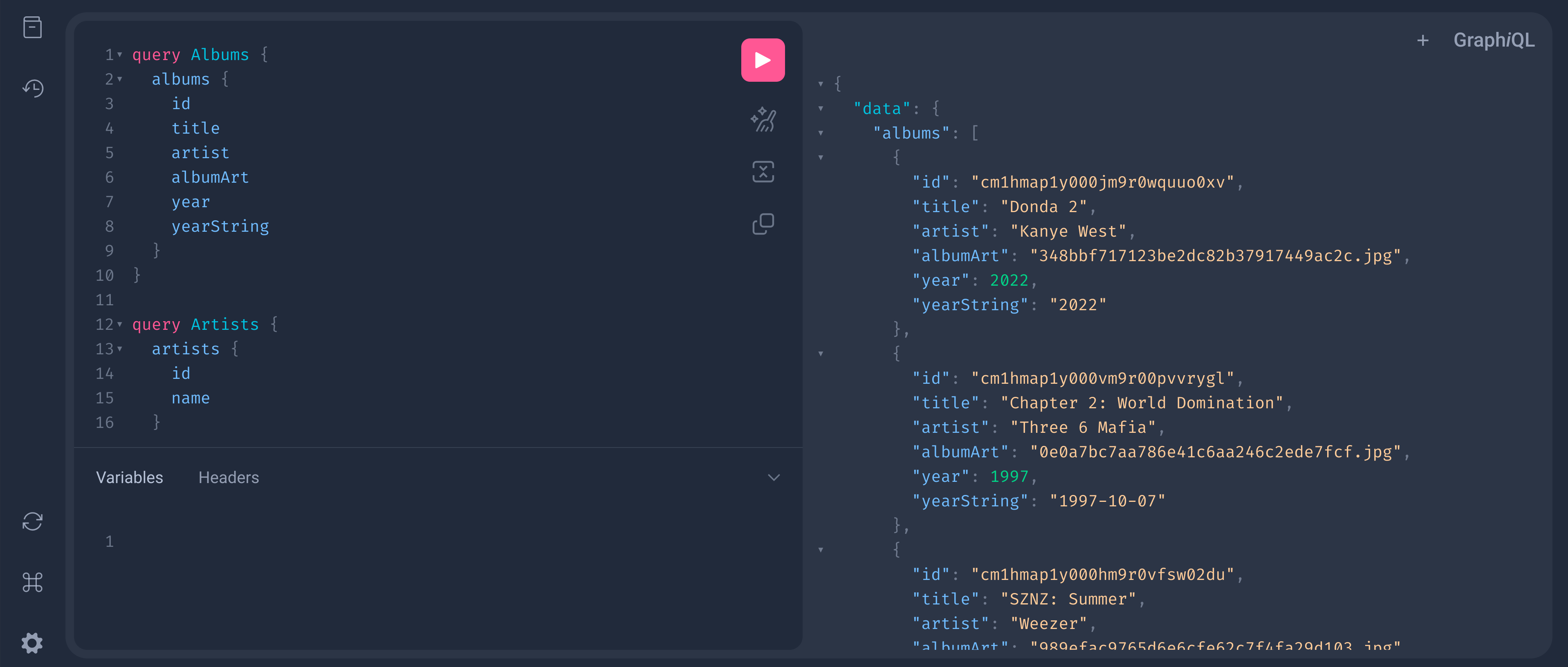
GraphQL#
Open http://localhost:6062/graphiql in your browser.
HTTP REST#
Open http://localhost:6063 in your browser.

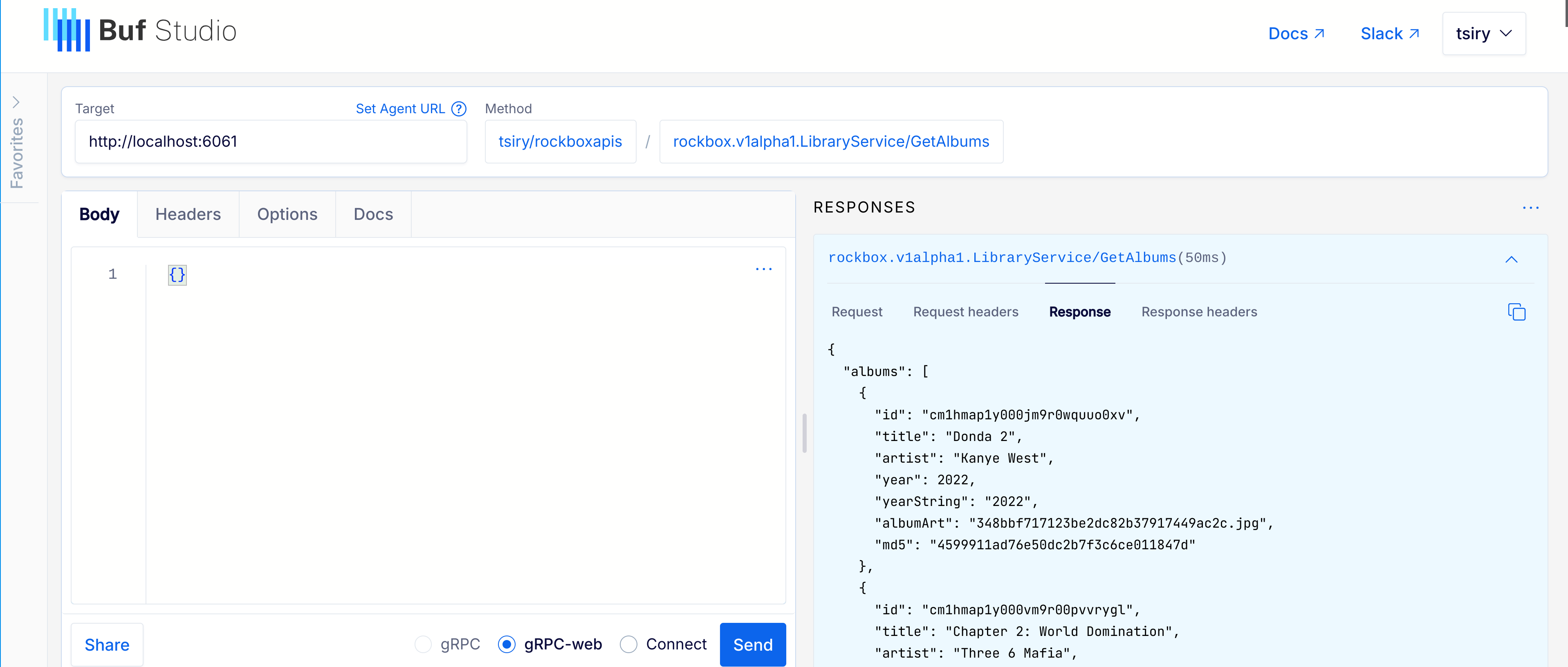
gRPC#
Docs: buf.build/tsiry/rockboxapis
Try it live with Buf Studio.
📖 Documentation#
Full guides, configuration reference, audio-output setup, API reference, and SDK docs are published at:
The Mintlify source lives in mintlify/. Topics covered:
- Getting started — install, quickstart, configuration
- Audio output — built-in SDL, Snapcast, AirPlay, Squeezelite, Chromecast, UPnP
- Audio settings — parametric EQ, DSP, ReplayGain, crossfade
- Clients — web UI, desktop apps, MPD, MPRIS
- API reference — HTTP REST (auto-generated from OpenAPI), GraphQL, gRPC, MPD
- SDKs — TypeScript, Python, Ruby, Elixir, Clojure, Gleam
- Architecture — build system, PCM sinks, cross-cutting concerns
- Reference —
rockboxandrockboxdCLI, ports,settings.toml, troubleshooting, FAQ